
 openelab.de
 openelab.com




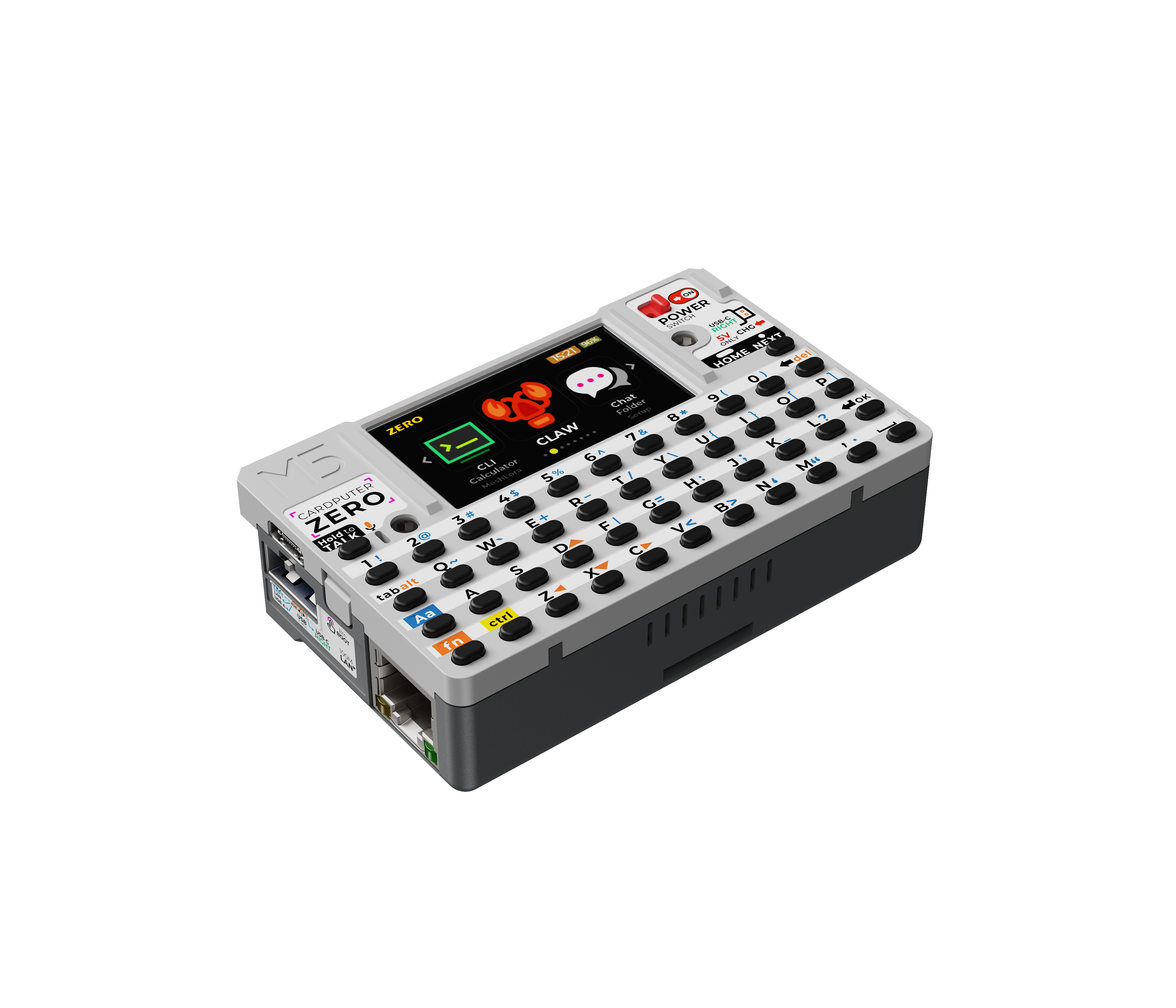
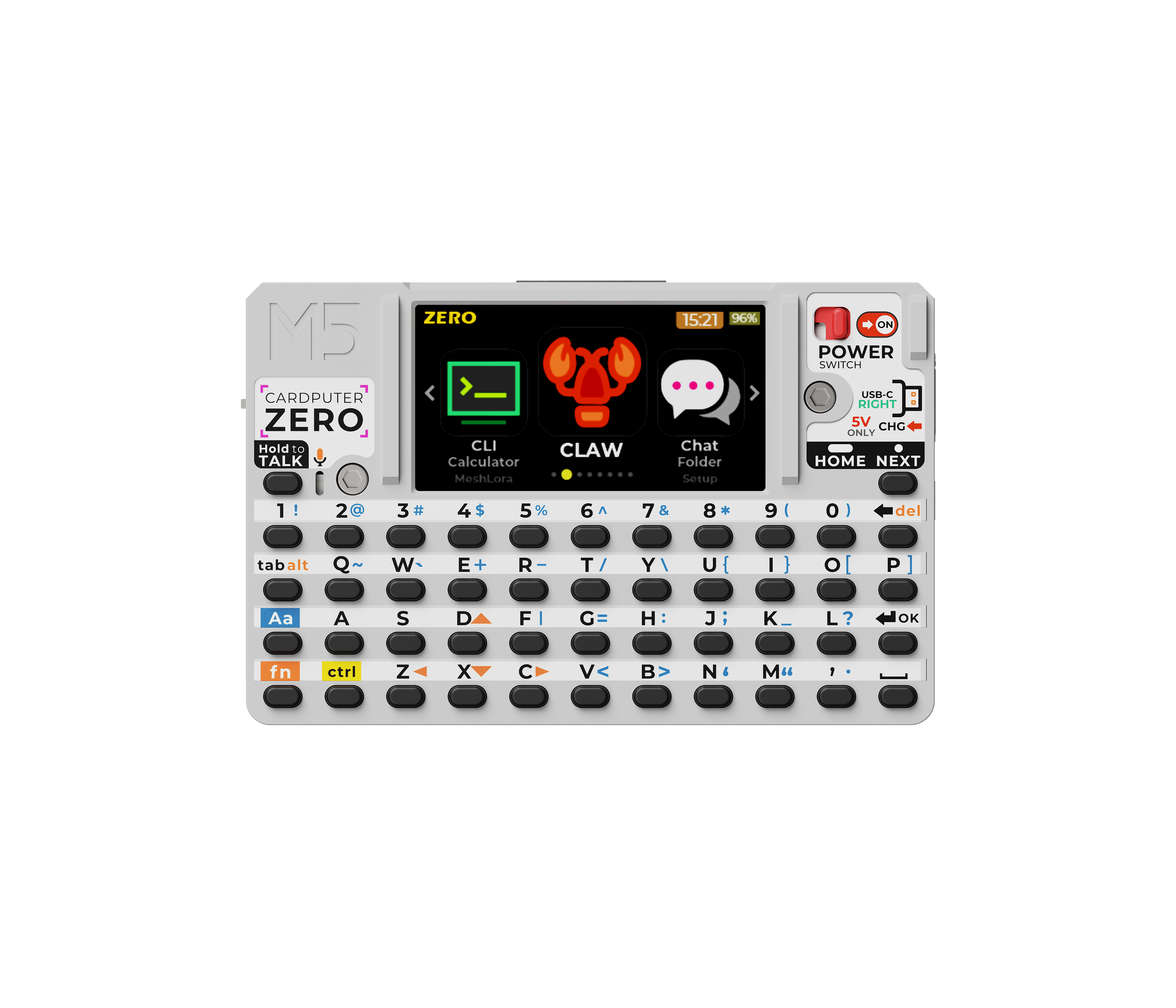
M5Stack Cardputer Zero is a pocket-sized Linux computer, not just another ESP32 Cardputer. The standard CardputerZero combines a quad-core Cortex-A53 processor, a 1.9-inch display, 46-key keyboard, 8MP camera, Ethernet, Wi-Fi, Bluetooth, USB, microSD and GPIO expansion in a handheld device for makers and developers. The Lite version is a lower-entry option without the 8MP camera, IMU/magnetometer and included 32GB microSD card.
The simplest way to choose is this: buy Cardputer Zero when your project starts with Linux, SSH, Python, camera capture or field debugging. Choose Cardputer ADV when your project starts with ESP32-S3 firmware, low-power embedded control or microcontroller-style IoT projects.
What Is M5Stack Cardputer Zero?
M5Stack Cardputer Zero, also written as CardputerZero or M5 CardputerZero, is best understood as a pocket Linux computer for makers. It keeps the handheld keyboard-and-screen idea that made the Cardputer series interesting, but the computing platform changes completely. Instead of starting with an ESP32-S3 microcontroller, Cardputer Zero starts with a Raspberry Pi Compute Module 0 class Linux platform.
That shift matters. A microcontroller device is excellent for firmware, sensor control, simple real-time I/O and low-power embedded work. A Linux handheld is better when you want a shell, package manager, file system, Python scripts, SSH, camera capture, network tools and user-space applications. Cardputer Zero sits closer to a tiny field terminal than to a normal embedded controller.
Important availability note: M5Stack's official CardputerZero documentation is marked as work in progress, and it says final features and documentation may change. Treat the specifications below as a practical planning baseline, then verify final hardware and software details before using it in a production design. The primary authority link is the M5Stack CardputerZero documentation.
Quick Answer: Who Should Buy Cardputer Zero?
Choose Cardputer Zero if you want a handheld Linux computer for real field work: logging into devices over SSH, running terminal commands, checking a gateway, collecting camera snapshots, testing Ethernet, or carrying small scripts without opening a laptop.
| If your project starts with... | Better choice | Why |
|---|---|---|
| Linux, SSH, Python, files and packages | Cardputer Zero | It is built around Raspberry Pi CM0 and a Linux software path. |
| Camera capture or lightweight OpenCV-style experiments | Cardputer Zero | The built-in IMX219 8MP camera and Linux environment fit visual logging and prototypes. |
| Ethernet field debugging | Cardputer Zero | 10/100M Ethernet and USB host support make it useful beside routers, gateways and industrial nodes. |
| ESP32-S3 firmware, IR control or low-power embedded UI | Cardputer ADV | ADV is an ESP32-S3 handheld terminal, not a Linux computer. |
| Lowest-cost Cardputer-style ESP32 experiments | Original M5Stack Cardputer | The original Cardputer remains the simpler microcontroller route. |
Cardputer Zero Key Specifications
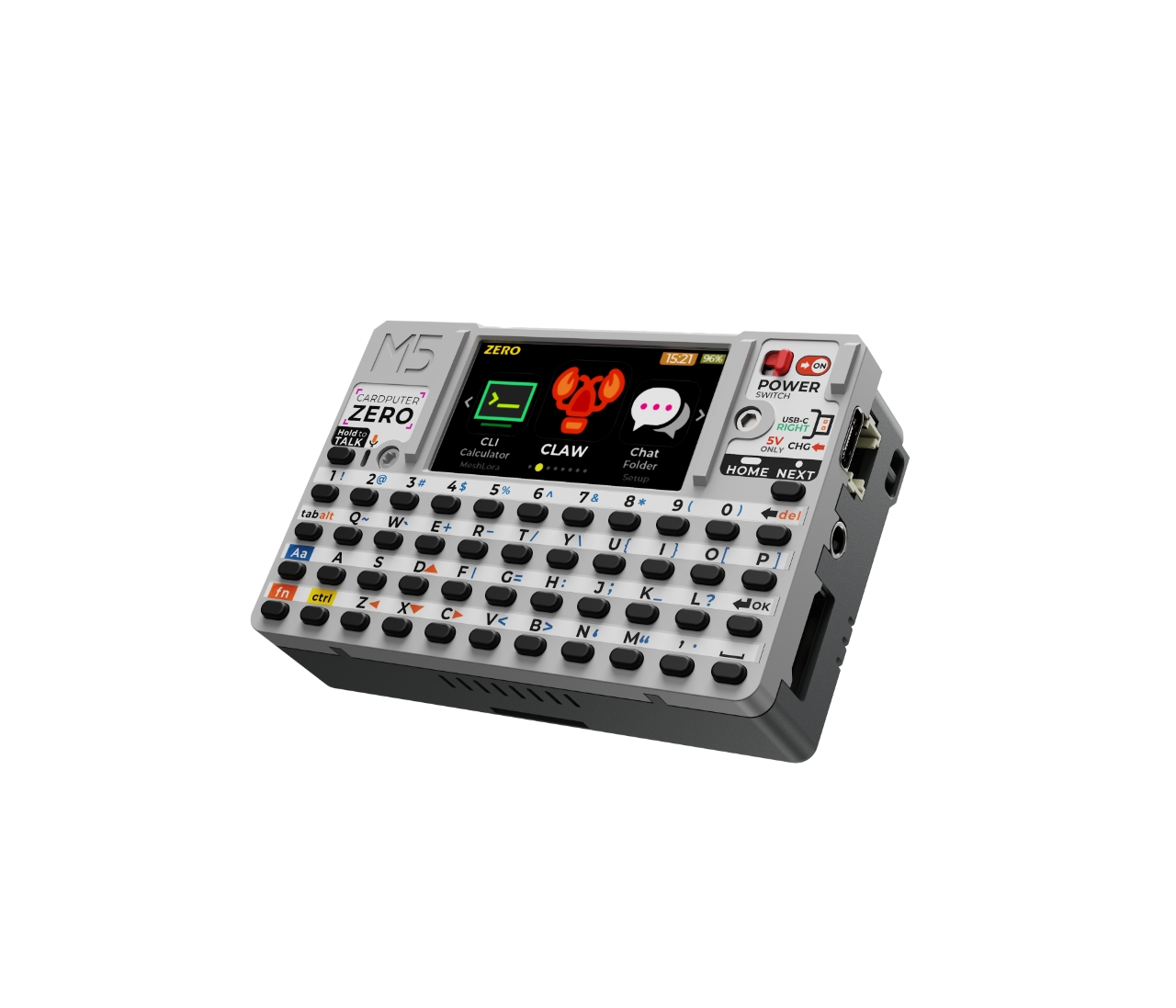
The spec sheet is unusual because it combines Raspberry Pi-style Linux, a tiny keyboard, camera, Ethernet, audio and expansion headers in a single portable device. That combination is why searches such as M5Stack Cardputer Zero specs, Cardputer Zero Raspberry Pi CM0 and portable Linux terminal are really the same buying question.
| Feature | M5Stack Cardputer Zero |
|---|---|
| Platform | Raspberry Pi Compute Module 0 |
| CPU | RP3A0 / BCM2837, quad-core Cortex-A53 @ 1GHz |
| Architecture | ARMv8-A / aarch64 |
| RAM | 512MB LPDDR2 |
| Storage | microSD |
| Display | 1.9-inch ST7789v3 LCD |
| Resolution | 170 x 320 |
| Keyboard | 46-key matrix keyboard |
| Camera | IMX219 8MP CSI camera |
| Wireless | 2.4GHz Wi-Fi and Bluetooth |
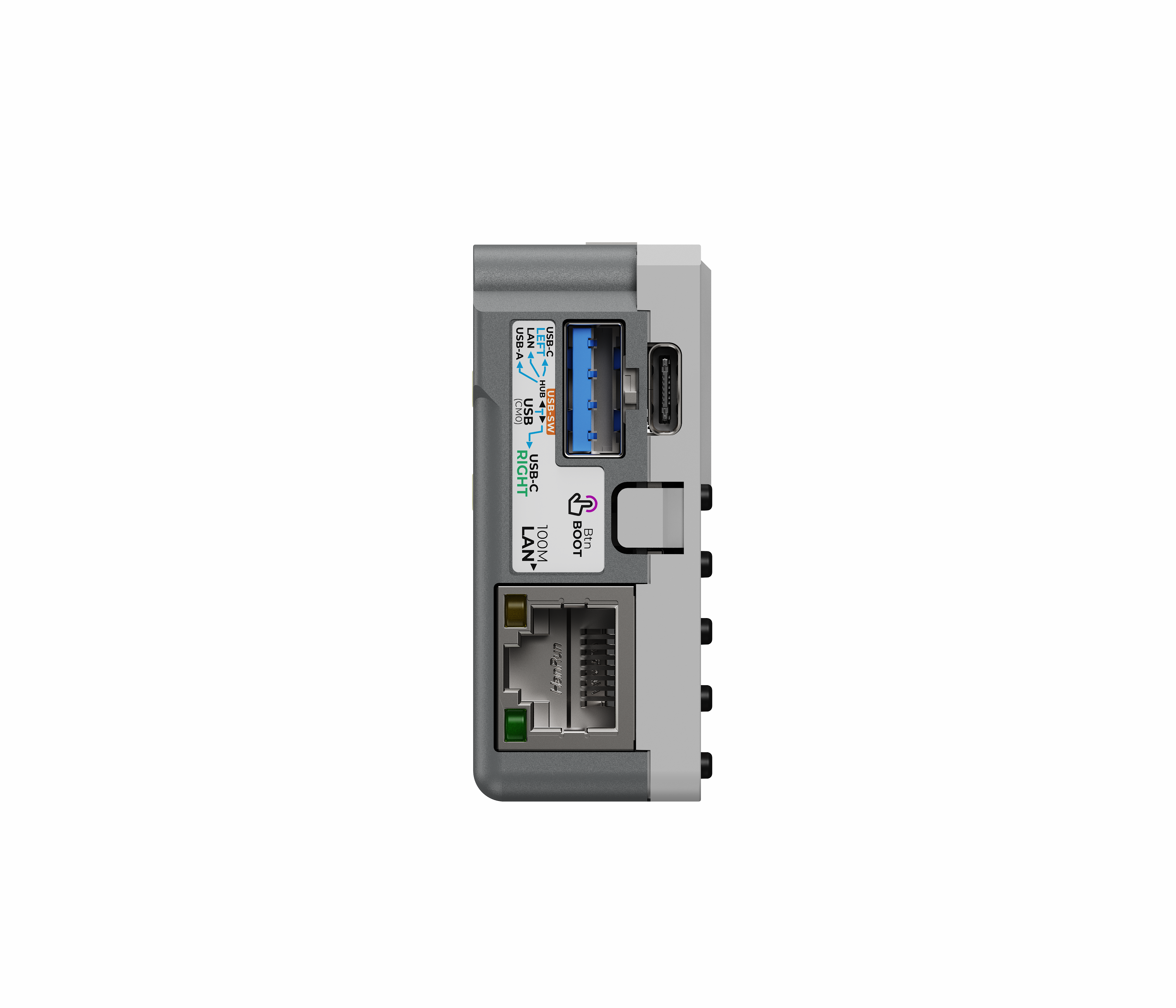
| Ethernet | 10/100M Ethernet through USB 2.0 Ethernet chip |
| USB | 1 USB-A 2.0, 2 USB-C 2.0, Host/Slave switching and USB OTG |
| Sensors | BMI270 IMU + BMM150 magnetometer |
| RTC | RX8130CE |
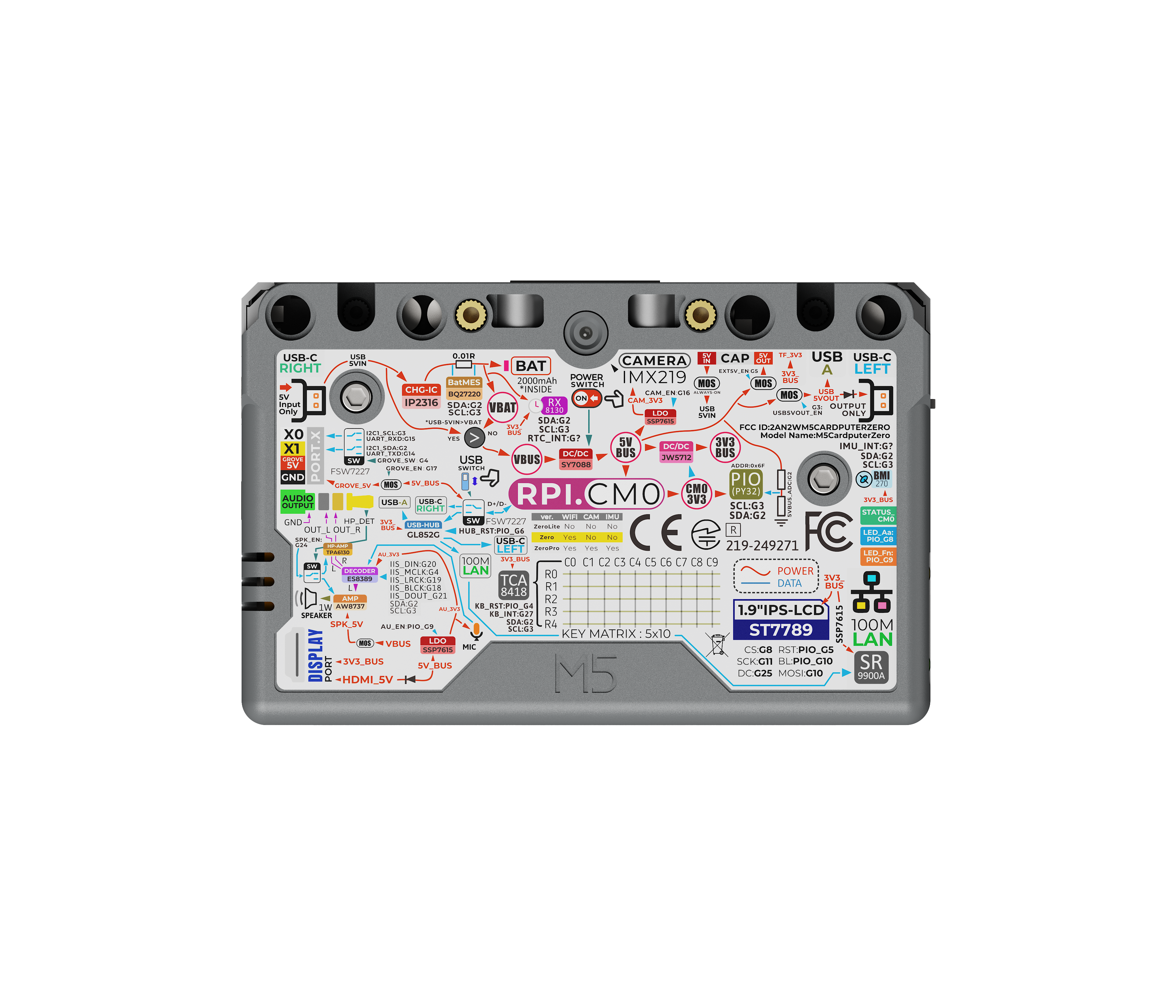
| Audio | ES8389 codec, MEMS microphone, 1W speaker, 3.5mm TRRS jack |
| Battery | 1750mAh lithium battery with gauge |
| Expansion | HY2.0-4P plus EXT 2.54-14P with SPI, UART, I2C, USB and GPIO |
| Best for | Linux terminal, IoT debugging, field tools and AI vision prototyping |
For software planning, M5Stack also publishes the CardputerZero Debian package repository and a CardputerZero application development template. Those links point toward an installable Linux application workflow, not the usual one-off microcontroller firmware workflow.
USB Host and Slave Mode: The Detail That Matters
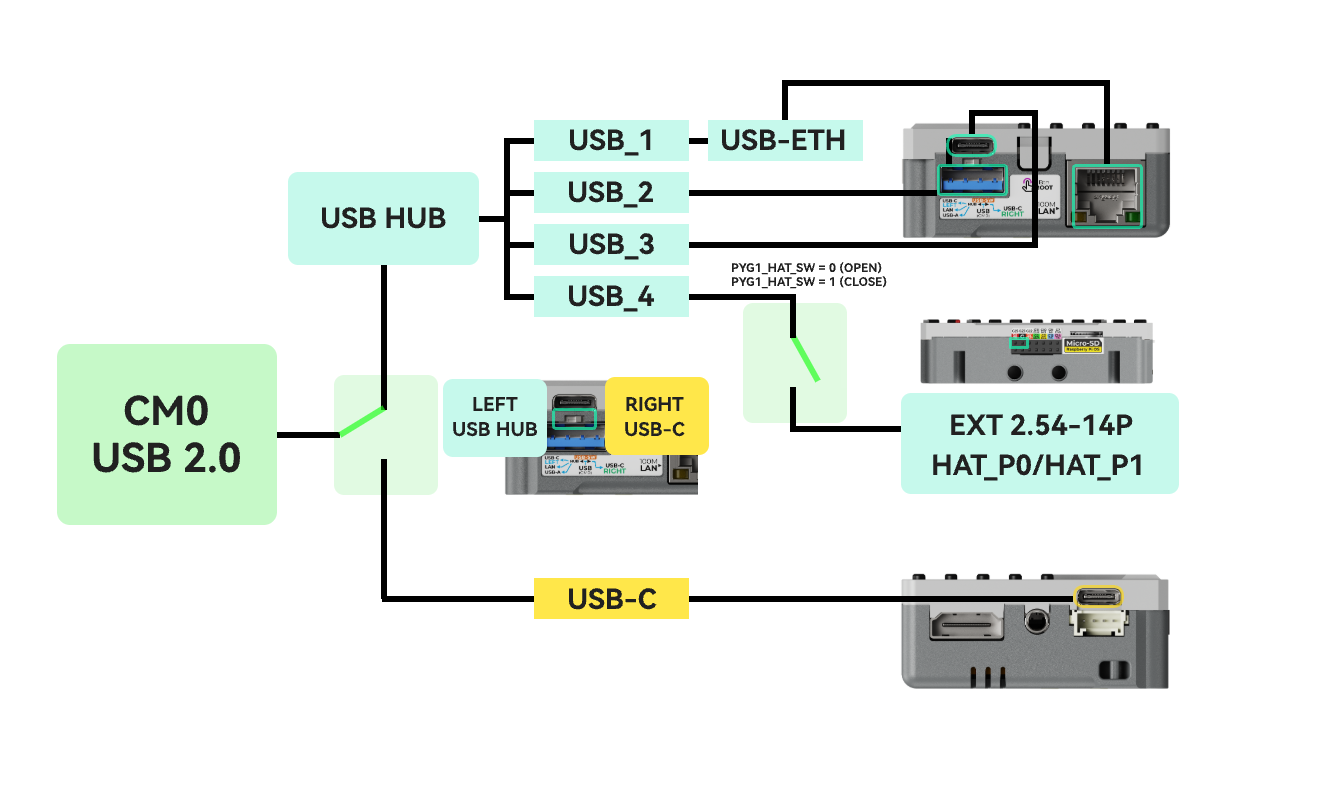
Cardputer Zero has a switchable USB Host/Slave architecture, and this affects Ethernet and USB accessories. In Host mode, the internal USB hub connects the USB-A port, Type-C ports, expansion USB path and Ethernet chip. In Slave mode, the hub-connected functions are unavailable, including Ethernet. If your project depends on Ethernet plus USB accessories, test the mode behavior before designing the final workflow.
First 30 Minutes With Cardputer Zero
After the system image is prepared, the first useful tests are simple: confirm boot, check storage, verify networking, test Ethernet, inspect USB mode and make sure the camera path is available. These checks help separate a working Linux handheld from a project idea that still needs setup work.
These commands are not a full setup script. They are quick field checks to confirm that the device has booted, storage is visible, networking works and recent kernel messages do not show obvious hardware errors.
For camera experiments, start with the official image and current M5Stack software notes before assuming a specific camera command or library path. The hardware includes an IMX219 CSI camera, but the software stack may evolve while the documentation is still marked as work in progress.
Cardputer Zero vs CardputerZero Lite
| Item | CardputerZero | CardputerZero-Lite |
|---|---|---|
| SKU | C154 | C155 |
| 8MP camera | Included | Not included |
| IMU + magnetometer | BMI270 + BMM150 included | Not included |
| Included microSD card | 32GB microSD included | Not included |
| Planning note | Ready to start with included storage | Prepare a compatible microSD card separately |
Cardputer Zero vs Cardputer ADV vs Original Cardputer
Cardputer Zero is better when your project starts with Linux. Cardputer ADV is better when your project starts with firmware. That is the key difference shoppers should remember before choosing from the M5Stack controller collection.
| Feature | Cardputer Zero | Cardputer ADV / Cardputer |
|---|---|---|
| Main platform | Raspberry Pi CM0 Linux | ESP32-S3 microcontroller |
| Best identity | Pocket Linux computer | Embedded handheld terminal |
| Software model | Linux tools, Debian packages, apps and scripts | ESP-IDF, Arduino, MicroPython-style firmware |
| CPU class | Quad-core Cortex-A53 | Dual-core Xtensa LX7 |
| Display | 1.9-inch 170 x 320 | 1.14-inch 240 x 135 |
| Keyboard | 46 keys | 56 keys |
| Camera | Built-in IMX219 8MP camera | No built-in camera |
| Ethernet | Built-in 10/100M Ethernet | Not built in |
| Best for | SSH, scripts, Linux apps, camera tools, field debugging | IR remote, embedded UI, sensor control, low-power MCU projects |
| Learning curve | Linux administration and packages | Embedded firmware and board support |
The M5Stack Cardputer ADV ESP32-S3 terminal is still the better fit when you need lower power, firmware-level control, simple UI logic, IR workflows or Grove-style embedded experiments. If you want to compare the microcontroller side of the ecosystem, the official Cardputer ADV documentation is the right technical reference.
For many buyers, the real question is not only Cardputer Zero vs Cardputer ADV, but also whether they need a pocket Linux computer, a portable SSH terminal or a smaller ESP32-S3 firmware device.
Best Use Cases for Cardputer Zero
Portable Linux Terminal for SSH and Field Debugging
Cardputer Zero can work as a pocket Linux terminal for checking network status, connecting to devices over SSH, running simple scripts and inspecting logs during IoT deployment. It is the kind of device you would keep in a service bag when a full laptop is too much but a phone terminal app is too limited.
For field debugging, the useful detail is not raw CPU speed. It is the combination of keyboard, screen, microSD storage, Wi-Fi, Bluetooth, Ethernet and USB host support in one small tool. That is why Cardputer Zero SSH terminal and Cardputer Zero Ethernet field debugging are realistic search intents.
Network and Ethernet Testing
Built-in 10/100M Ethernet is one of the clearest differences between Cardputer Zero and Cardputer ADV. In real IoT work, Ethernet often shows up at gateways, routers, PoE switches, industrial controllers, MQTT brokers and camera networks. A small Linux device that can plug into Ethernet, request DHCP, ping a gateway and check local services has practical value.
Because Ethernet depends on the USB Host/Slave architecture, test the mode before relying on Cardputer Zero Ethernet in a field workflow. That is especially important when the same setup also needs USB accessories.
IoT Device Debugging and Deployment Tool
The HY2.0-4P and EXT 14-pin expansion paths give Cardputer Zero room to interact with serial, I2C, SPI, USB and GPIO-oriented devices. It is not a replacement for a lab oscilloscope, logic analyzer or industrial protocol tester. It is more realistic as a compact field companion for reading serial logs, running setup scripts, checking small nodes and documenting installation status.
That distinction matters for buyer expectations. A Linux handheld is useful because it can run practical tools and store files locally. It is not automatically a calibrated measurement instrument.
Lightweight AI Vision and Camera Prototyping
The IMX219 8MP camera makes Cardputer Zero much more interesting than a normal terminal-only handheld. It can be used for lightweight camera capture, QR recognition, visual logging, simple OpenCV experiments or dataset collection. Do not treat 512MB RAM as a large AI computer. If your project needs heavy neural-network inference, compare larger edge AI systems such as our reComputer RK3576/RK3588 edge AI box guide.
Cardputer Zero is most credible for lightweight camera and vision prototyping when the work is small: capture a photo, run a compact script, test lighting, store samples, check a model input pipeline or validate whether a location is suitable for a camera-based sensor.
Maker Linux App Development
CardputerZero apps are likely to be the most interesting long-term angle. A small screen and keyboard force you to design compact interfaces, while Linux lets you use normal development habits: files, packages, services and scripts. M5Stack's Debian repository and application template point in that direction.
If you are coming from ESP32-S3 TinyML, remember that this is a different path. ESP32-S3 projects focus on firmware and microcontroller inference; Cardputer Zero focuses on Linux applications and higher-level tools. For the microcontroller side, see our ESP32-S3 TinyML guide.
Portable Data Collection Device
Camera, IMU, magnetometer, RTC, microSD and battery power make Cardputer Zero plausible as a field data collection terminal. It could support inspection notes, location-adjacent equipment checks, lab sample logging, agricultural observations, storage-room audits or mobile test scripts. The key is to keep expectations aligned with the hardware: compact workflows, not laptop-scale dashboards.
Linux Software, Apps and Debian Package Support
Cardputer Zero's Linux direction is the biggest reason this product deserves a separate article. A pocket Linux computer can use familiar command-line concepts, package installation, file permissions, shell scripts, Python programs and small services. That is a very different learning curve from compiling firmware for a microcontroller.
At the same time, the official documentation still shows parts of the software stack as developing. SDK and kernel information may evolve. For production planning, confirm the current image, package repository, kernel support, camera stack, audio stack, USB mode behavior and power management before standardizing on Cardputer Zero.
What Cardputer Zero Is Not Good For
Cardputer Zero is exciting precisely because it is small, but small hardware also creates hard limits. It is not a Raspberry Pi 5 replacement, not a full laptop replacement and not a heavy AI workstation. The 512MB RAM figure should immediately set expectations for browser use, large Python environments, database workloads and modern AI frameworks.
It is also not the best choice if your project only needs a simple ESP32 board. For low-power sensors, IR controls, firmware demos or microcontroller dashboards, an ESP32-S3 device such as Cardputer ADV may be simpler. For larger AI workloads, look at camera and edge AI hardware rather than expecting a pocket terminal to do everything.
Finally, avoid framing it as a Flipper Zero alternative or as an offensive security gadget. It can be used as a portable Linux operations terminal, but the stronger commercial story is field debugging, Linux learning, IoT maintenance, data capture and maker app development.
Which Cardputer Should You Buy?
| Need | Best choice | Reason |
|---|---|---|
| Linux shell, SSH and Python scripts | Cardputer Zero | It runs a Linux software path on Raspberry Pi CM0. |
| ESP32-S3 firmware and low-power control | Cardputer ADV | It is simpler for embedded firmware and MCU workflows. |
| Camera capture and visual logging | Cardputer Zero | The IMX219 camera and Linux tools fit lightweight vision work. |
| IR remote, Grove sensors and portable MCU UI | Cardputer ADV | The ESP32-S3 platform fits direct embedded control better. |
| Basic Cardputer-style experiments at lower cost | Original Cardputer | It keeps the simpler ESP32 handheld route. |
When Cardputer Zero Makes More Sense Than a Raspberry Pi Board
Choose Cardputer Zero instead of a bare Raspberry Pi-style board when you need the screen, keyboard, battery, camera, Ethernet and enclosure-like handheld format already integrated. Choose a normal Raspberry Pi board when you need larger displays, more RAM, standard HAT compatibility or a more mature ecosystem. This is the practical difference between a Raspberry Pi CM0 handheld and a general-purpose Raspberry Pi development board.
Buying Recommendation
Choose Cardputer Zero when the project starts with Linux, SSH, Python, camera capture, Ethernet or field diagnostics. It makes the most sense as a portable Linux computer for IoT, a pocket debugging terminal and a compact tool for Linux scripts outside the lab.
Choose Cardputer ADV when the goal is ESP32-S3 firmware. Choose Cardputer Zero when the goal is a pocket Linux computer. That distinction will prevent most wrong purchases.
Frequently Asked Questions
Is M5Stack Cardputer Zero based on ESP32?
No. M5Stack Cardputer Zero is based on the Raspberry Pi CM0 platform with an RP3A0 / BCM2837 Cortex-A53 processor. Cardputer and Cardputer ADV are the ESP32-S3 handheld devices in the Cardputer family.
Can Cardputer Zero run Linux?
Yes. Cardputer Zero is designed as a Linux handheld computer. The official documentation points to image flashing, ADB connection/debugging and application template resources, while the package repository suggests a Debian-style app installation workflow.
What is Cardputer Zero Lite?
CardputerZero-Lite keeps the same Raspberry Pi CM0, Wi-Fi/Bluetooth and IR direction, but the official comparison shows that it does not include the 8MP camera, IMU/magnetometer or 32GB microSD card. Choose the standard CardputerZero if camera capture, motion sensing or ready-to-boot included storage matters.
Is Cardputer Zero good for AI?
It is suitable for lightweight camera and vision prototypes, such as image capture, QR recognition, visual logging and small OpenCV-style tests. It is not a good match for heavy local AI models, large language models or GPU/NPU-class workloads.
Cardputer Zero or Cardputer ADV: which should I buy?
Choose Cardputer Zero for Linux, SSH, Python, camera capture, Ethernet and field debugging. Choose Cardputer ADV for ESP32-S3 firmware, lower-power embedded control, IR workflows, simple handheld UI and microcontroller projects.
Can Cardputer Zero replace a Raspberry Pi Zero 2 W?
Not exactly. It uses a Raspberry Pi CM0 platform, but the form factor, keyboard, display, camera, USB routing, Ethernet and expansion layout are different. Treat it as a handheld Linux terminal, not a drop-in Raspberry Pi Zero 2 W board substitute.
Does Cardputer Zero have Ethernet?
Yes. The official specifications list 10/100M Ethernet through a USB 2.0 Ethernet chip. Because USB Host/Slave mode affects hub-connected functions, verify the mode behavior before designing a workflow around Ethernet plus USB accessories.
Can I use Cardputer Zero as a portable SSH terminal?
Yes. That is one of its clearest use cases. Cardputer Zero combines Linux, keyboard input, Wi-Fi, Ethernet, USB and local storage, so it can be useful for SSH, network checks, logs and small scripts during IoT field work.
Does Cardputer Zero support USB accessories?
Yes, but USB behavior depends on Host/Slave mode. In Host mode, the internal USB hub enables USB expansion and Ethernet. In Slave mode, hub-connected functions such as Ethernet are unavailable, so verify the mode before relying on USB accessories in a project.


