
 openelab.de
 openelab.com




A Raspberry Pi 5 can run without a case, but a suitable enclosure makes it safer, cooler and much easier to use as a finished computer. The right Raspberry Pi 5 case protects the board, keeps ports accessible and creates a reliable path for cooling.
Short answer: You do not strictly need a case for a Raspberry Pi 5 on a test bench. For a desktop, media centre, home server, storage system or everyday project, a case is strongly recommended. It reduces the risk of shorts and physical damage, keeps dust away from the board and makes cooling, storage and cabling easier to manage.

Want a more complete Raspberry Pi 5 desktop build? The Elecrow PiTower Gen 2 is a practical choice when you want enclosure protection, cooling hardware, an integrated display and internal SSD expansion in one compact setup.
Buy the Elecrow PiTower Gen 2Why put a Raspberry Pi 5 in a case?
The Raspberry Pi 5 is a powerful single-board computer, but the exposed circuit board is not ideal for long-term use. A case gives the board a stable footprint and helps prevent accidental contact with metal objects, loose cables, dust and static. It also makes the system easier to move between a desk, workshop or living-room setup.
A good raspberry pi case should do more than cover the board. It should leave the USB, HDMI, Ethernet, USB-C power, microSD and GPIO connections usable. It should also provide enough internal space for the cooler, storage devices and any accessories that you plan to install.
Raspberry Pi 5 cooling: is a fan or active cooler necessary?
For light tasks, the Raspberry Pi 5 may operate acceptably with basic passive cooling. Under sustained CPU loads, compiling, emulation, high-resolution media work, storage activity or AI workloads, temperatures can rise and the board may reduce its operating speed to protect itself. That is why Raspberry Pi 5 cooling matters when the computer will be working for long periods.
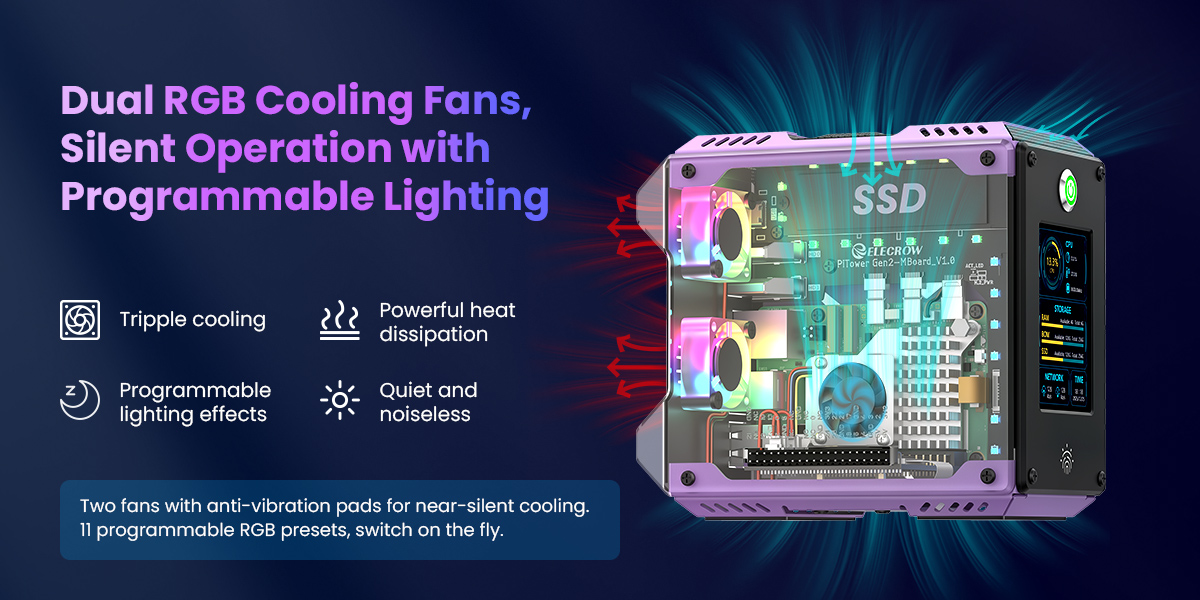
A Raspberry Pi 5 heatsink can help move heat away from the processor, while a Raspberry Pi 5 fan or Raspberry Pi 5 active cooler can move that heat into the surrounding air. You may also see the same solution described as an active cooler Raspberry Pi 5 setup, an rpi 5 active cooler or a Raspberry Pi 5 case with fan. The important point is the complete thermal path: contact between the chip and cooler, airflow through the enclosure, unobstructed vents and a stable power supply.

What makes the Elecrow PiTower Gen 2 a useful Raspberry Pi 5 case?
The Elecrow PiTower Gen 2 is designed as a compact mini tower around the Raspberry Pi 5. Its aluminum alloy and transparent acrylic construction gives the board a more finished home while keeping the overall build easy to inspect. The tower format also leaves room for useful upgrades that are difficult to arrange neatly on an open bench.
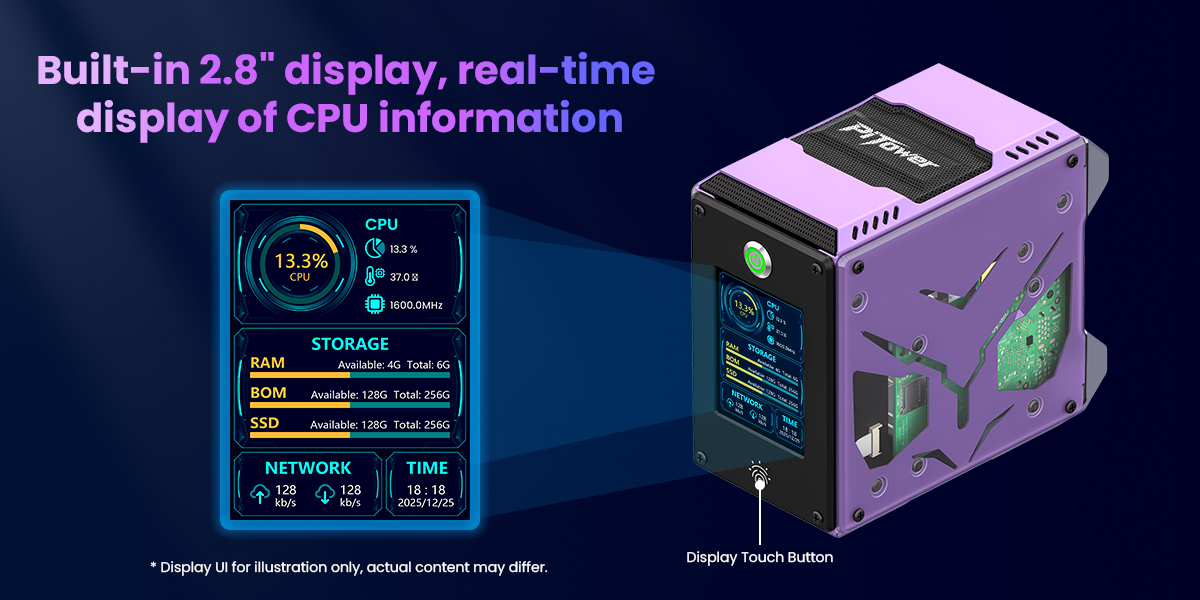
Built-in 2.8-inch IPS touchscreen
The integrated 2.8-inch IPS display has a 320 × 240 resolution and supports touch interaction. It can be used for system information, a small control panel, project status, dashboards or a custom interface without adding a separate monitor to the main enclosure.
Dual M.2 SSD expansion
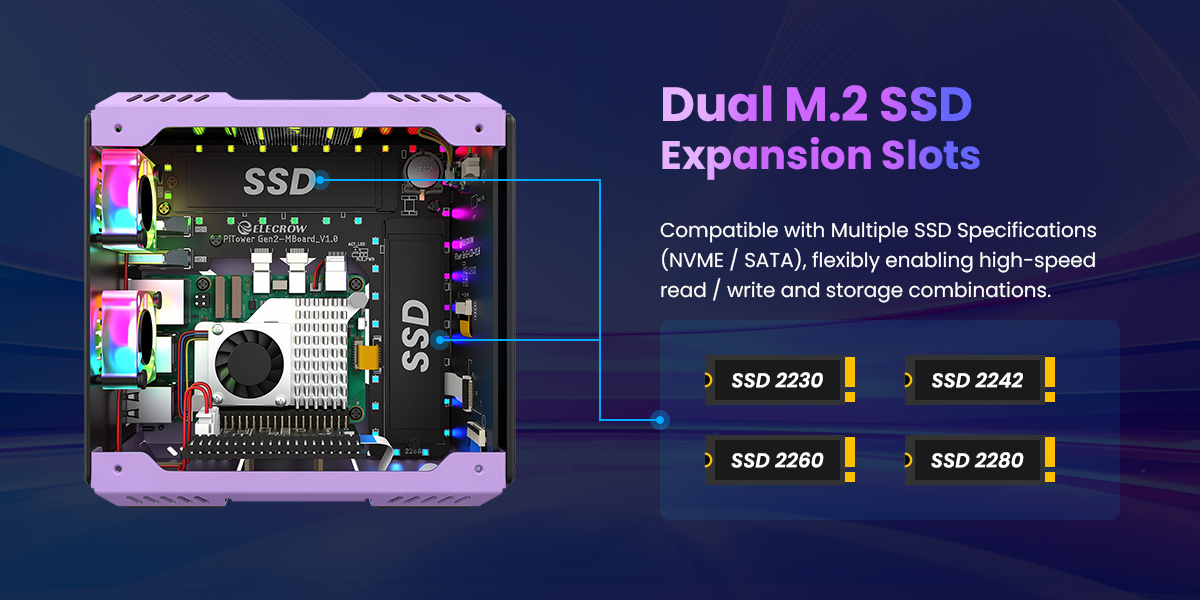
Two internal M.2 SSD slots provide a cleaner storage option than relying only on a microSD card. The enclosure supports common 2230, 2242, 2260 and 2280 form factors, with NVMe and SATA compatibility depending on the installed drive and adapter configuration. This makes the case attractive for a home server, local file storage, media library or development machine.
Accessible ports and a practical desktop layout
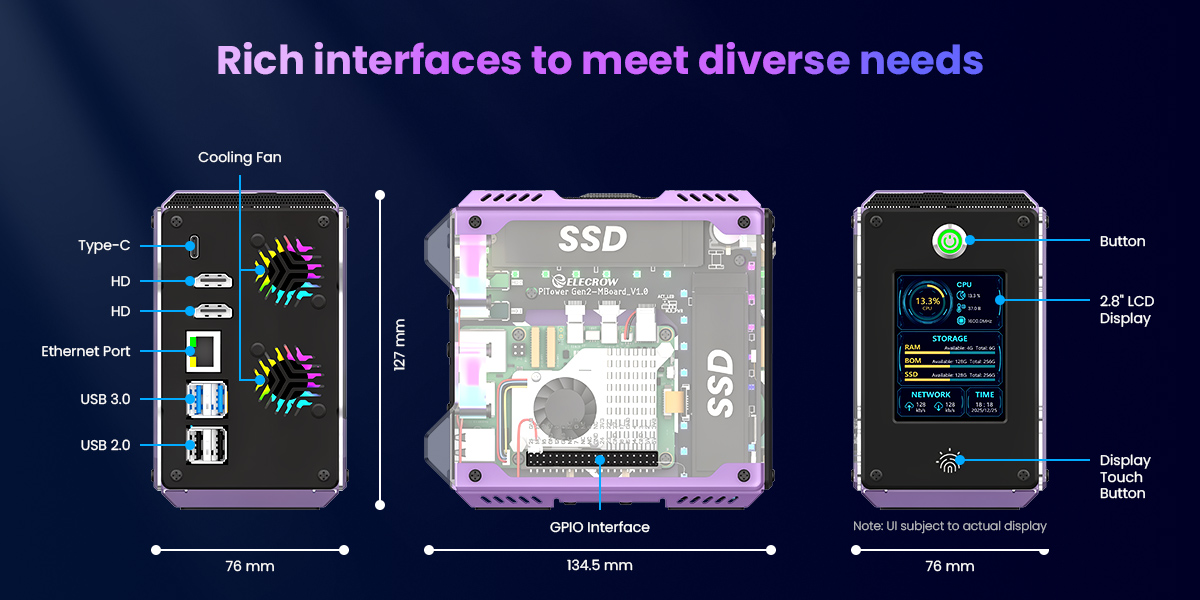
The enclosure keeps the Raspberry Pi 5's main connections available, including USB, HDMI, Ethernet, USB-C power, microSD and GPIO access. It also adds a power button, touch control, HDD activity indication, RGB lighting and RTC support for a more appliance-like experience.
How does it compare with other Raspberry Pi cases?
A small open-frame case is inexpensive and convenient for quick experiments. A simple Raspberry Pi 5 cooler is also enough when you only need to manage processor temperature. The PiTower Gen 2 is aimed at a different use case: a tidy, expandable computer that combines protection, cooling, display and storage in one enclosure.
For older boards, shoppers may compare a Raspberry Pi 4 case, Raspberry Pi 4B case, Raspberry Pi 4 tower case or a mini tower case kit for Raspberry Pi 4B. They may also look for a Raspberry Pi 4 case with fan, a Raspberry Pi 4 heat sink, a Raspberry Pi 4 heatsink or a Raspberry Pi 4 case with screen. Those products are not automatically compatible with the Raspberry Pi 5: the board layout, power requirements, cooling arrangement and mounting details need to match.
Likewise, a handheld case for Raspberry Pi 5, Raspberry Pi Pico case, aluminum case or compact Raspberry Pi 5 heatsink case serves a different purpose. Choose the enclosure around the way the computer will be used, the add-ons it must support and the amount of airflow it needs.
Check HATs, AI accelerators and accessories before installation
If your Raspberry Pi 5 will run an AI accelerator or another HAT, check the complete thermal and mechanical setup before installation. For a Hailo-8L accelerator, confirm the module's cooling requirements and use the correct thermal pad or cooling accessory specified for that hardware. Then check physical clearance, connector alignment, cable direction, airflow and the power budget of the complete build.
A built-in cooler can improve the Raspberry Pi 5's thermal performance, but it does not automatically solve the needs of every add-on board. The PiTower Gen 2 should be treated as the enclosure and cooling foundation; the final setup still depends on the Raspberry Pi board, SSDs, HATs, accelerator, power supply and workload.
Elecrow PiTower Gen 2 specifications
| Feature | Details |
|---|---|
| Compatibility | Designed for Raspberry Pi 5 |
| Display | 2.8-inch IPS TFT touchscreen, 320 × 240 resolution |
| Storage | Dual M.2 SSD slots; supports 2230, 2242, 2260 and 2280 sizes, subject to the drive and adapter configuration |
| Materials | Aluminum alloy and transparent acrylic |
| Cooling | Integrated cooling hardware with airflow support for sustained workloads |
| Controls and indicators | Power button, touch switch, HDD LED, RGB lighting and RTC support |
| Size | Approximately 134.5 × 127 × 76 mm |
| Weight | Approximately 385 g net weight |
Frequently asked questions
Can a Raspberry Pi 5 run without a case?
Yes. It can run on a non-conductive work surface, but the exposed board is easier to damage and harder to keep dust-free. A case is the safer option for a permanent installation.
Does a Raspberry Pi 5 need active cooling?
Not for every light task, but active cooling is recommended for sustained CPU use, demanding applications, emulation, storage-heavy services and AI workloads. Make sure the cooler and enclosure work together as one airflow path.
Is the PiTower Gen 2 compatible with a Raspberry Pi 4?
The PiTower Gen 2 is designed for Raspberry Pi 5. A Raspberry Pi 4, Raspberry Pi 4 Model B or Raspberry Pi 4B should use a case designed for that board unless the enclosure documentation specifically confirms compatibility.
Does the product include a Raspberry Pi 5 or SSDs?
No. The Raspberry Pi 5 board, M.2 SSDs and power supply are separate components unless a retailer's bundle explicitly says otherwise. Check the package contents before ordering.
Build a cleaner Raspberry Pi 5 system
If you want more than a basic cover, the Elecrow PiTower Gen 2 brings together enclosure protection, cooling support, a 2.8-inch touchscreen and dual M.2 expansion in a compact mini tower.
Shop PiTower Gen 2 at OpenELAB


